
In this comparison
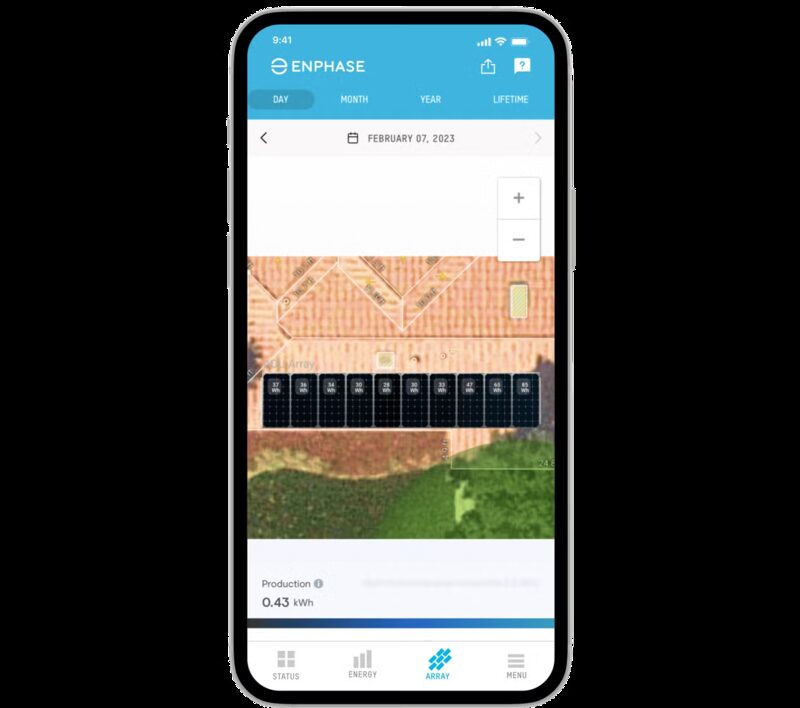
Enphase and SolarEdge both sell a solar system and the software that watches it. The monitoring app is not an accessory to the hardware; it is the part of the system a household actually lives with, and it is where the two companies differ most. Enphase builds its platform around microinverters, one per panel, and reports each panel's performance in real time through the Enphase App, so shade, dirt or a fault can be spotted instantly1. SolarEdge builds around string inverters with power optimizers at each module, and states that its Monitoring Platform tracks each individual module2.
Both apps are free at the level most households use. SolarEdge describes mySolarEdge as free to use, and module-level monitoring is built into its inverters rather than sold separately2. Enphase splits the offering: the Enphase App gives system status, current and past production and per module energy data, while system power production, playback and smarter notifications sit in the premium Enlighten Manager tier, sold as a lifetime subscription4.
The practical difference for a household is what the app can see and control beyond the panels. SolarEdge's app reaches into battery, EV charging and third-party appliances through the SolarEdge ONE Controller; Enphase's reaches into its own battery, EV charger and a set of connected appliances through the Enphase Energy Management System5. Neither replaces a smart meter, and neither shows everything a household generates: an in-home display usually shows the energy being bought from a supplier rather than everything generated8.
Two monitoring ecosystems compared
SolarEdge describes its software as a complete ecosystem for designing, installing and monitoring the SolarEdge ecosystem, covering inverters, power optimizers, batteries, backup solutions and smart energy devices13. The company was founded in 2006 and states it has millions of systems installed in over 140 countries14. Its monitoring reputation rests on panel-level optimisation: guidance for UK buyers notes SolarEdge has a strong reputation for panel-level optimisation and monitoring, and that it is often favoured for complex roofs with mixed orientation or partial shade15.
Enphase's ecosystem is built the other way round. Because each panel has its own microinverter, panel-level data is a property of the hardware rather than something added by optimizers. Good Energy names both Enphase and SolarEdge among the trusted brands it uses, citing enhanced safety features16. SolarEdge's safety feature is its patented SafeDC technology, which reduces voltage at the module when the system is shut down16.
The two companies also differ in what they sell alongside monitoring. SolarEdge is a one-stop shop for panels, storage batteries, inverters and optimizers, and Which? notes that many owners found its panels reliable, maintenance-free and efficient, while some found the manufacturer difficult to contact and felt their return was poor17. Which? had not lab-tested any SolarEdge solar panels as of 202617.
For a household, the choice of ecosystem is largely made by the installer. Which? found that nearly half of SolarEdge panel owners chose them because they were the only brand their installer fitted17. That is a useful thing to know before comparing apps: the app follows the hardware, not the other way round.
What each app shows: live production, panel-level data and alerts
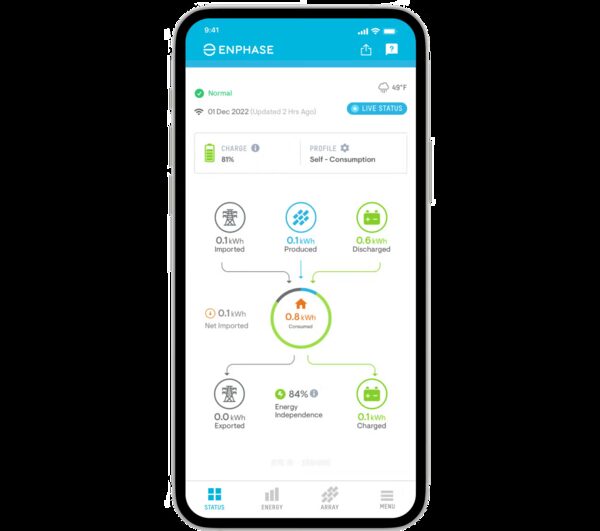
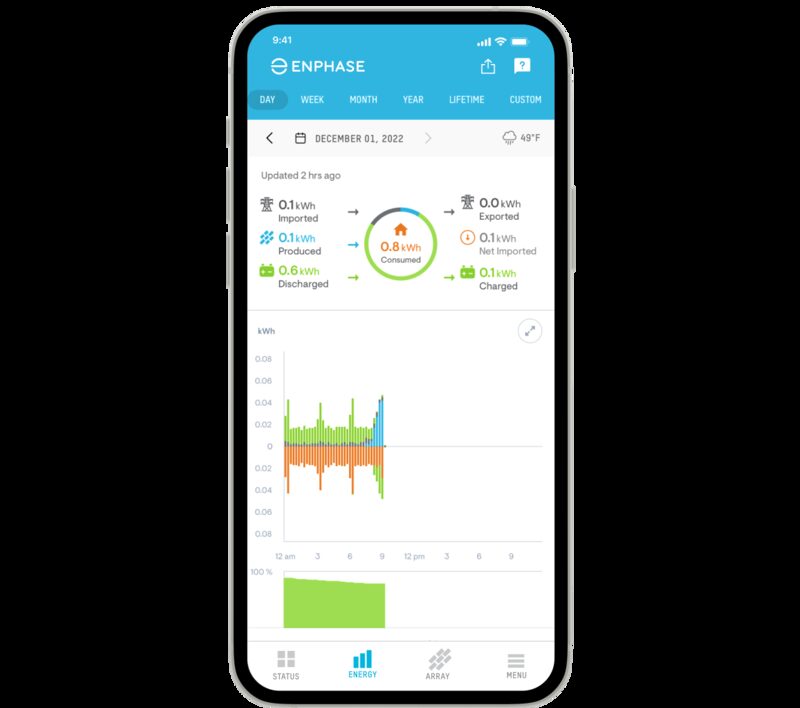
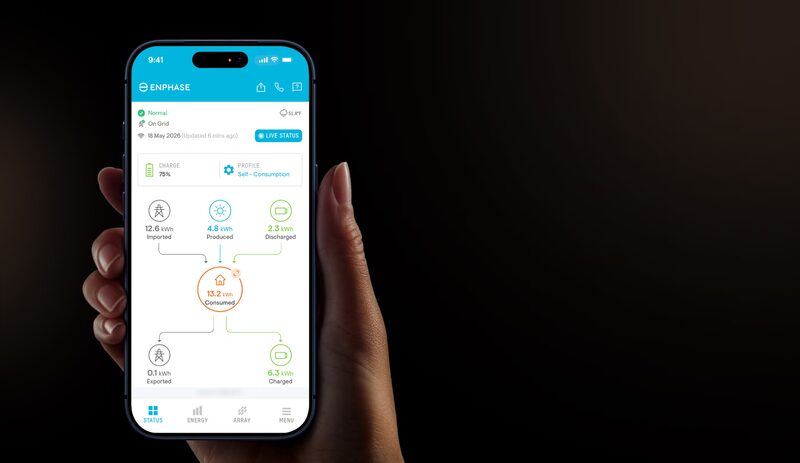
The Enphase App monitors live solar production and generates reports on energy production by day, week, month or year1. Its free tier gives quick access to system status, current and past production, per module energy data, and easy sharing on social media4. The main Status screen summarises energy produced and consumed, with details on energy pulled from the grid and batteries18.
mySolarEdge monitors real-time production and consumption, and the wider app tracks real-time solar production and home energy use, manages battery, EV charging and connected devices, and automatically optimises energy use2. It shows system performance and energy consumption with real-time power flow illustrations, comparative graphs and easy-to-read charts2.
| Feature | Enphase App | mySolarEdge |
|---|---|---|
| Live production | Yes, with daily to yearly reports1 | Yes, real-time production and consumption2 |
| Panel-level data | Each panel's performance in real time1 | Underperforming modules identified across the PV layout2 |
| Premium tier | Enlighten Manager, lifetime subscription4 | Not sold as a subscription; free to use2 |
| Battery control | Battery activity shown in Status screen18 | Battery managed from the app2 |
| EV charging | IQ EV Charger smart features when integrated with an Enphase Energy System11 | ONE EV Charger controlled and optimised from the app10 |
| Third-party appliances | Home Connect enabled appliances, consumption values estimated19 | Select third-party appliances via the ONE Controller13 |
Alerts differ in character. SolarEdge's smart modules with integrated power optimizers support a virtual layout of the system to aid fault detection and remediation, remote system monitoring and automatic fault notifications20. Its Home Wave inverter offers module-level monitoring with pinpointed fault detection5. Enphase delivers over-the-air software updates that bring the latest features to the solar system and the Enphase App, and its Assistant reports device health and system status21.
Enphase added an AI Assistant to the Enphase App in August 2026. That framing, energy independence as a displayed metric, is unusual among solar apps and is worth noting for what it measures: a ratio, not a guarantee.
Panel-level monitoring: how each platform tracks individual modules
SolarEdge's approach puts an optimizer behind each module, and the monitoring follows. The SolarEdge ONE Controller is compatible with the SolarEdge Monitoring Platform, which tracks each individual module, and the Home Short String Inverter does the same3. mySolarEdge identifies underperforming modules with a holistic view of the entire PV layout2. Guidance for UK buyers notes that both Enecsys and SolarEdge provide systems with maximum power point tracking at the panel level15.
Enphase's approach puts a microinverter on each module. The Enphase App shows each panel's performance in real time, so shade, dirt or issues can be spotted instantly and the household knows where to look1. The Enphase Enlighten app offers panel-level visibility, showing energy production from each panel24.
The practical difference is in granularity and in what happens when something fails. With optimizers, a single shaded or faulty module is isolated by the optimizer and reported by the platform; the rest of the string continues. With microinverters, each panel converts independently, so a failure affects one panel's output and one panel's data point. Both give a household the same basic capability: knowing which panel is underperforming rather than only that the system as a whole is down.
One independent account of a UK installation describes the experience plainly:
"It's easy to monitor performance, as the app on my phone has a simple dashboard"
That is the level most households actually use. Panel-level data matters most on a roof with mixed orientation, shading or more than one array, which is exactly the case where SolarEdge's optimizers are often specified15.
Export vs self-consumption: seeing where your solar power goes
Seeing where power goes requires metering, not just monitoring. SolarEdge's Energy Meter with Modbus Connection enables production, consumption or import/export monitoring, and supplies meter readings to the inverter for export limitation7. That second function matters in the UK, where some network operators require export limitation as a connection condition.
mySolarEdge shows system performance and energy consumption with real-time power flow illustrations, comparative graphs and easy-to-read charts2. SolarEdge ONE optimises the way homeowners use, store and sell their energy, according to their preferences13. The word "sell" is doing real work there: export is a revenue stream, and the app is where a household sees it.
Enphase's Assistant gives daily or hourly breakdowns of solar production, home energy consumption, battery activity and grid usage10. The Status screen summarises energy produced and consumed, with details on energy pulled from the grid and batteries18. The metrics it surfaces, Solar Offset, Grid Dependence and Energy Independence, are all ratios of self-consumption to import10.
The limit to keep in view is that a solar app is not a smart meter. Smart Energy GB states that an in-home display will usually show the energy being bought from a supplier rather than everything generated, and that in future it may also reflect self-generated energy such as from solar panels8. So a household with solar typically has two views of its energy: the supplier's meter, which sees import and export at the boundary, and the maker's app, which sees generation and, where a meter is fitted, consumption inside the home. Neither is complete on its own.
EV charging and smart energy management in the apps
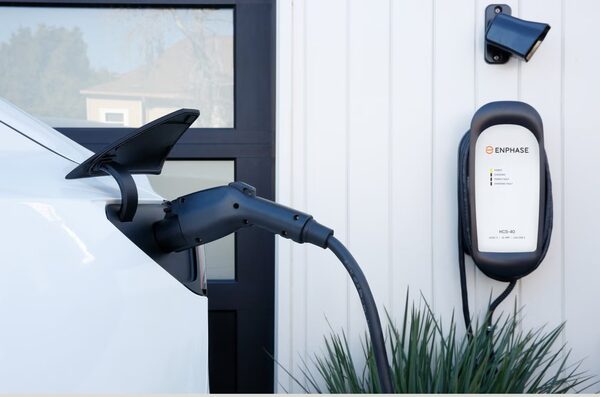
SolarEdge's ONE EV Charger is controlled and optimised from mySolarEdge, and the company states the app gives full control of PV production, smart devices, EV and storage10. Its smart features include excess PV charging to prioritise solar energy use, load balancing, a smart schedule supporting dynamic time-of-use tariffs, automatic phase switching, MID metering and ISO15118 readiness10. The app can also enable or disable the home battery for charging the EV, according to the household's needs10. SolarEdge's wider EV charger range is marketed on charging smarter when utility rates are low27.
Enphase's IQ EV Charger unlocks smart features such as solar charging when integrated with an Enphase Energy System11. Smart Charging launched in the Enphase App in April 2026, letting a household set a target driving range and departure time, after which charging is optimised using solar and low-tariff grid periods11. Enphase also published guidance in October 2025 on managing EV charging from the app across standalone, solar-paired and battery-paired setups11.
Both makers extend beyond their own hardware. SolarEdge ONE can integrate with select third-party appliances, including EV chargers and heat pumps, through the SolarEdge ONE Controller13. Enphase has partnered with Home Connect so that Home Connect enabled appliances can be connected to a solar installation through the Enphase App19.
That caveat is worth carrying across the whole comparison. Appliance-level figures in a solar app are often modelled from a whole-home measurement rather than metered at the plug, and the maker says so.
Data, API access and where your energy data is stored
Both platforms are cloud services. SolarEdge states that security measures are in place to enable secure transfer and storage of user data and energy usage data in a data centre in Germany9. It describes a Cyber Informed Engineering principle, embedding information security mechanisms into products from the initial design stages, and says it participates in technical committees to align product designs with upcoming regulations and distributed energy resource cybersecurity standards9.
Enphase does not give a storage location in the material reviewed. Its Assistant, when logged in, can access real-time system data, device status, energy history and account details to give personalised answers, and the data it draws on includes devices and their health, energy production and consumption, battery activity, grid usage, system settings, site details and support history10. When logged out, it can only answer general questions about Enphase products, solar energy and troubleshooting10.
On access by others, SolarEdge runs a separate installer-facing Monitoring Platform, described as an installer smart energy monitor solution that enables viewing of homeowner PV performance and remote troubleshooting of system issues25. The SolarEdge ONE Controller allows integrated devices to be managed via mySolarEdge6. Enphase states its app provides 24/7 remote monitoring and management1.
For a household that wants its energy data to stay in the home, neither platform offers that by default. Local access is a separate subject, covered in local data access and Modbus, and the wider question of what a solar app adds to a smart meter is set out in monitoring a solar and battery system at home.
Which app suits which household
The honest answer is that the app follows the hardware, and the hardware is usually chosen by the installer. Which? found that nearly half of SolarEdge panel owners chose the brand because it was the only one their installer fitted17. A household comparing apps in isolation is comparing the wrong thing first.
Where the choice is genuinely open, the deciding factors are roof complexity and what else is being controlled. SolarEdge is often favoured for complex roofs with mixed orientation or partial shade, and its app reaches further into battery, EV and third-party appliance control through the ONE Controller13. Enphase's per-panel data comes from the microinverter architecture itself, and its app is the interface for an Enphase Energy System that brings generation, storage, control and management together11.
On cost, SolarEdge describes mySolarEdge as free to use2. Enphase's premium tier, Enlighten Manager, is sold as a lifetime subscription, and it is where system power production, playback and smarter notifications sit4. A household that wants those specific features is buying them; a household that wants status, production history and per-module data is not.
On independence, both apps increase visibility and neither removes dependence. The panels, the inverter, the battery and the app all come from one manufacturer, the data sits in that manufacturer's cloud, and the household's ability to see and control its own system runs through that company's servers and its terms. A standalone energy monitor costing £100 to £400 depending on the type gives a second, independent view of the whole supply, but it does not replace panel-level data12. The two together are closer to a complete picture than either alone.
Sources28 cited
- Enphase App for homeowners, Enphase Energy, 2026
- mySolarEdge monitoring app, SolarEdge, 2026
- SolarEdge Home Short String Inverters, SolarEdge, 2026
- Enlighten Manager upgrade lifetime subscription, Enphase Energy, 2026
- SolarEdge Home Wave Inverters, SolarEdge, 2026
- SolarEdge ONE Controller, SolarEdge, 2026
- SolarEdge Energy Meter with Modbus Connection, SolarEdge, 2026
- How do smart meters work?, Smart Energy GB, 2026
- Why solar cybersecurity matters, SolarEdge, 2024
- SolarEdge ONE EV Charger, SolarEdge, 2026
- Enphase Energy Management System, Enphase Energy, 2026
- Making the most of your solar PV panels, Centre for Sustainable Energy, 2026
- SolarEdge ONE, SolarEdge, 2026
- SolarEdge Home, SolarEdge, 2026
- What to look for in solar PV, Spirit Energy, 2026
- 5 things to know before getting solar panels, Good Energy, 2025
- SolarEdge solar panels review, Which?, 2026
- Control EV charging in the Enphase App, Enphase Energy, 2023
- Enphase connected appliances FAQs, Enphase Energy, 2026
- SolarEdge Home Energy Solutions blog, SolarEdge, 2022
- Enphase home solar systems, Enphase Energy, 2026
- Enphase home solar systems (UK), Enphase Energy, 2026
- Best solar monitoring apps, LuxPowerTek, 2026
- SolarEdge residential products, SolarEdge, 2026
- A homeowner's experience of solar panels and battery storage, MCS Certified, 2024
- Smart Energy GB FAQs, Smart Energy GB, 2025
- SolarEdge residential EV charging, SolarEdge, 2026
- Enphase support: Enphase Assistant, Enphase Energy, 2026
 Solar and Battery MonitoringWhat does your solar and battery app actually show you, and can you trust it?
 Monitoring a Solar PV SystemHow do you keep an eye on what your solar panels are actually generating?
 Supplier Apps and AccountsWhat can you actually do in your supplier's app?
 Solar and Energy IndependenceHow far domestic solar cuts dependence on suppliers and the grid, what self-consumption really looks like across the year, what a battery, diverter or EV adds, and the grid-outage limit of ordinary inverters.
 AC-Coupled vs DC-CoupledCan you add a battery to your existing solar panels without swapping the inverter, and does one kind waste more of your solar power than the other?
 Types of Home EV ChargerWhich home charger suits your car and your driveway?